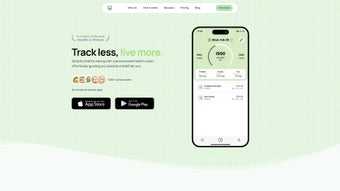

Download Calorieasy – AI‑Powered Calorie Tracker, Free & Secure
Overview & Core Features
Calorieasy is redefining how health‑focused individuals monitor their daily nutrition by combining artificial‑intelligence photo recognition with a sleek, web‑based interface. Traditional calorie‑counting apps often force users to type in each ingredient, estimate portion sizes, and manually adjust macros—a process that can become tedious and error‑prone. Calorieasy eliminates that friction: you simply snap a clear picture of your meal, and within seconds the AI engine returns a detailed breakdown of total calories, protein, carbohydrates, and fats. The system is trained on millions of food images, allowing it to recognize common dishes, packaged foods, and even mixed meals with a high degree of accuracy. Beyond raw numbers, the platform offers a lifestyle quiz that tailors daily calorie targets to your age, weight, activity level, and specific goals—whether you aim to lose weight, gain muscle, or maintain a balanced diet.
The feature set has been carefully curated to support both beginners and seasoned athletes. An interactive nutritional timeline visualizes intake trends over days, weeks, or months, helping you spot hidden patterns such as late‑night snacking or weekend calorie spikes. An automated calendar stores each logged meal, making meal planning and retrospective analysis effortless.
Secure, end‑to‑end encryption safeguards your personal health data, and because Calorieasy is a progressive web app (PWA), it runs on any modern browser—Windows, macOS, Linux, Android, or iOS—without the need for separate store downloads. The free tier unlocks all core functionalities, including AI photo logging, personalized goals, timeline, and calendar. For power users, a premium subscription adds advanced analytics, custom meal plans, ad‑free usage, and priority AI model updates.
Exportable CSV and PDF reports enable seamless collaboration with nutritionists, trainers, or health coaches, turning raw data into actionable recommendations. Overall, Calorieasy blends cutting‑edge AI with practical nutrition science, delivering a fast, secure, and user‑friendly calorie‑tracking experience.
- AI Photo Recognition: Upload a meal photo and receive instant calorie and macronutrient data.
- Personalized Calorie Goals: A quick lifestyle quiz calibrates daily targets to match your fitness objectives.
- Nutritional Timeline & Calendar: Visualize intake trends and automatically store each entry.
- Cross‑Platform Web App: Works on Windows, macOS, Linux, Android, and iOS browsers.
- Secure Cloud Storage: End‑to‑end encryption protects personal health information.
- Free Core Version & Premium Upgrade: Access essential tools at no cost; unlock deeper insights with a subscription.
- Exportable Reports: Generate CSV or PDF summaries for professional sharing.
- Continuous AI Improvements: Regular model training improves food‑recognition accuracy.
- Ad‑Free Experience (Premium): Focus on tracking without interruptions.
- GDPR & CCPA Compliance: Full control over data export and deletion.
By consolidating these capabilities into a single, intuitive interface, Calorieasy eliminates the manual data‑entry barrier that often discourages consistent tracking. The AI‑driven workflow not only saves time but also reduces human error, while the personalized goal engine keeps motivation high by aligning daily targets with long‑term health ambitions. Whether you are a busy professional juggling meetings, a competitive athlete fine‑tuning macros, or a newcomer just learning the basics of nutrition, Calorieasy offers a scalable solution that grows with your needs.
Installation & Usage Guide
Step‑by‑Step Setup (≈300 words)
- Navigate to the official website calorieasy.com. The homepage presents a prominent Download button that initiates the PWA installation process.
- For desktop browsers (Chrome, Edge, Firefox, Safari), clicking Download prompts a small banner asking if you’d like to Add to Home Screen. Accepting creates a shortcut on your desktop, giving the feel of a native app while still running in the browser.
- On Android or iOS devices, tap the Add to Home Screen prompt that appears after the first visit. This creates an app‑like icon on your home screen, allowing offline access to previously cached pages.
- Create a free account using your email address or sign in quickly with Google or Apple ID. Account creation takes less than a minute and syncs your data across all devices.
- Complete the Lifestyle Quiz, which asks for basic information (age, weight, activity level, goal). The quiz takes about two minutes and instantly generates personalized daily calorie targets.
Logging a Meal with AI (≈300 words)
Once logged in, the dashboard displays a large Upload Meal Photo button. Follow these steps for optimal results:
- Capture a Clear Image: Use natural lighting, keep the plate centered, and avoid cluttered backgrounds. The AI model performs best with high‑contrast photos.
- Select or Take a Photo: Choose an existing image from your gallery or use the built‑in camera feature to snap a fresh shot.
- Processing: The cloud‑based AI engine analyses the image in 3–5 seconds, identifying food items, estimating portion sizes, and calculating total calories and macro distribution.
- Review & Edit: A summary card appears with calorie, protein, carbohydrate, and fat values. If the AI misidentifies an ingredient, you can manually adjust the portion or swap items.
- Tag & Save: Add contextual tags (e.g., “breakfast”, “post‑workout”) and optional notes. Press Save to record the entry in your timeline and calendar.
Analyzing Data & Generating Reports (≈250 words)
The Timeline tab visualizes daily intake with interactive line and bar charts. Hover over any data point to see a detailed macro breakdown for that day. The Calendar view lets you click on specific dates to review all logged meals, making it simple to detect patterns such as weekend overeating or missed meals.
For deeper insight, navigate to the Reports section where you can generate weekly, monthly, or custom‑range summaries. Reports are exportable as CSV or PDF, enabling seamless sharing with dietitians, personal trainers, or health insurance programs. Premium subscribers enjoy advanced analytics, including macro ratio trends, predicted weight change curves, and personalized meal‑plan suggestions based on historic data.
The entire workflow—from installation to analysis—is designed for speed and clarity, ensuring that users spend more time acting on insights and less time wrestling with data entry.
Compatibility, Pros & Cons
Calorieasy is a responsive progressive web app built on modern HTML5, CSS3, and JavaScript standards. It runs flawlessly on any up‑to‑date browser, including Chrome, Edge, Firefox, Safari, and Opera. Because it operates entirely in the cloud, there is no need for platform‑specific installers or app‑store approvals. Whether you’re on a Windows 10 laptop, a macOS Ventura desktop, a Linux distribution, an Android smartphone, or an iPhone running iOS 16, you can access your account, log meals, and view reports with identical functionality. The PWA architecture also enables a lightweight “install” that creates a native‑like shortcut while still leveraging the browser’s security sandbox and automatic updates.
Pros
- Instant calorie and macro calculation via AI photo recognition saves time.
- Personalized daily targets based on a quick lifestyle questionnaire.
- Comprehensive nutritional timeline and calendar for easy trend spotting.
- Secure, encrypted cloud storage protects personal health data.
- Free core version provides all essential features without hidden fees.
- Cross‑platform compatibility eliminates device lock‑in.
- Exportable CSV/PDF reports facilitate professional collaboration.
- Regular AI model updates improve food‑recognition accuracy over time.
- Ad‑free experience available for premium subscribers.
- GDPR and CCPA compliance gives users full data‑control rights.
Cons
- Requires an active internet connection for new photo uploads; offline mode is limited to viewing cached data.
- Complex mixed dishes (e.g., casseroles, stews) may be misidentified and need manual correction.
- Premium features such as advanced analytics and custom meal plans require a subscription.
- Photo quality heavily influences AI accuracy; poor lighting can lead to errors.
- No native integration with popular wearables or health‑tracking APIs at present.
Frequently Asked Questions
Is Calorieasy really free to use?
Yes, the core calorie‑tracking features—including AI photo recognition, personalized goals, timeline, and calendar—are completely free. A premium subscription unlocks advanced analytics, custom meal planning, and an ad‑free experience.
How accurate is the AI calorie estimation?
The AI model has been trained on millions of food images and typically delivers accuracy within ±5 % for standard dishes. Complex mixed meals may require manual adjustment, but the system continuously learns from user corrections to improve over time.
Can I use Calorieasy without an internet connection?
Calorieasy primarily operates online because the AI processing happens on secure cloud servers. A limited offline mode allows you to view previously logged entries, but new photo uploads require an active connection.
Does Calorieasy sync with other health apps?
Currently, Calorieasy offers CSV and PDF export for manual import into platforms such as MyFitnessPal, Apple Health, or Google Fit. Direct API integrations are under development and are expected in a future update.
How is my personal data protected?
All user data is encrypted both in transit (TLS 1.3) and at rest. Calorieasy complies with GDPR and CCPA standards, providing users with full control over data export, correction, and permanent deletion.
Conclusion – Take Control of Your Nutrition Today
Calorieasy bridges the gap between cutting‑edge AI technology and practical nutrition tracking. Its photo‑based logging eliminates the tedious manual entry that often deters users, while the personalized calorie targets keep your goals realistic and motivating. With a free tier that already offers robust features, you can start seeing immediate benefits without any financial commitment. If you’re ready to simplify meal tracking, gain actionable insights, and stay accountable to your health objectives, download Calorieasy now and experience a smarter way to manage your diet.



.png)



